
Redact before you share it.
An iPhone app that finds the text in your photos and screenshots — names, addresses, card numbers, IBANs — and permanently removes it. Detection and redaction both run on the phone. There is no server to send anything to.
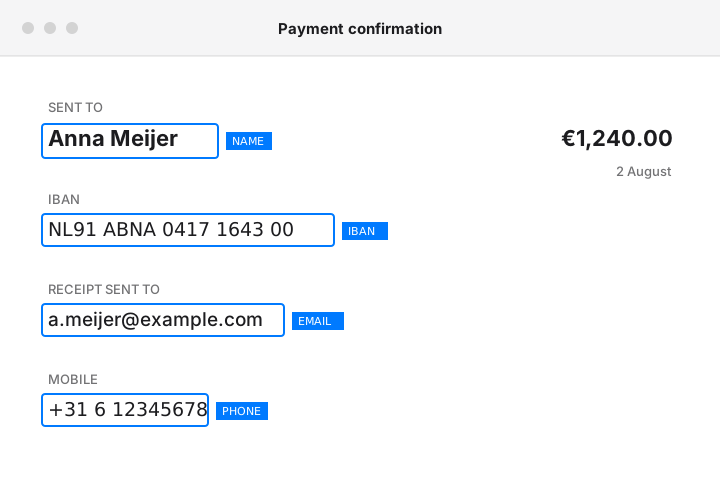
Detected
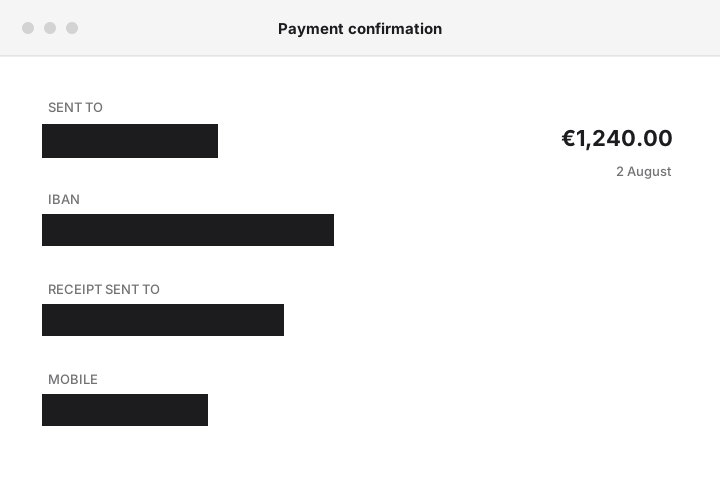
Exported
Everything stays on your phone
Detection and redaction run through Apple's Vision and Core Image frameworks. No image, no detected text, and no redaction choice ever leaves the device.
Tap to redact
Import a photo or a screenshot and every line of text it finds is outlined. Tap the parts you want gone.
Auto-hide sensitive text
One tap finds and covers names, emails, phone numbers, addresses, links, card numbers, IBANs, and passport or ID machine-readable zones.
Three redaction styles
Solid fill, pixelate, or blur. Solid fill is included free; the other two come with the one-time purchase.
Works from any app
Share an image in from Photos or Safari, redact it, and send the result straight back out without opening the app first.
Your own dictionary
Add terms you always want covered — a project codename, an account number, a name — and they are found on every photo from then on.
No accounts, no setup
Nothing to sign in to. Open it, pick a photo, redact.
Card numbers are validated with the Luhn algorithm and IBANs with the mod-97 checksum, so a long number that isn't one won't be mistaken for one. On iPhones running iOS 26 or later, an additional Apple Intelligence pass can also flag dates of birth, national ID numbers, and usernames. Automatic language detection covers English and German by default, and Dutch when the device has the Dutch Vision model installed. The technical detail is here.
Three steps, no round trip
-
Import
Choose a photo, take one, or share it in from another app. Several at once, if you want.
-
Redact
Accept what the detector found, remove what you don't want covered, or select text it missed by hand.
-
Export
Save, share, or copy the redacted copy. The original in your library is never modified.
Three times this week you should have used it
-
Pasting a screenshot into an LLM
You crop to the error message, but the tab bar, the account name, and half an email thread come along with it. What actually leaks when you upload a screenshot to a chat product.
-
Sending a bank statement to your accountant
They need the transactions. They don't need the full account number, and neither does whichever mail provider stores the attachment.
-
Filing a bug report with a customer in the frame
The screenshot that proves the bug also carries a real person's name and address into a ticket that half the company can read.
“Can't I just use Markup?”
For a quick scribble, yes. Markup is free, built in, and already on your phone. Two things it won't do: it finds nothing for you — every region is drawn by hand, so anything you don't notice stays in the image — and a photo edited in Photos keeps its original, recoverable through Revert to Original.
The full comparison, including when Markup is the better answer
Don't take the privacy claim on faith
“It never uploads anything” is the entire product, and an assertion is worth very little. Here is how to check it yourself.
- Turn on airplane mode Every part of the app behaves identically with the radios off. Detection, redaction, and export are local operations; nothing waits on a response.
- Read the App Store privacy label It declares no data collection at all — no identifiers, no usage data, no diagnostics. That label is a binding statement to Apple, not marketing copy.
- The only network-capable path is StoreKit There are no network calls in the codebase. The one Apple service it talks to is StoreKit, for the one-time purchase, and photos are not part of that exchange.
What it can't do
- iPhone only — no iPad, no Mac, no Android.
- Requires iOS 16.0 or later; Apple Intelligence detection requires iOS 26+.
- Finds text, not faces — it does not detect or blur faces.
- Images only — no PDF support, no video support.
- Automatic language detection covers English and German by default, with Dutch added when the device has the Dutch Vision model installed.
- Blur and pixelate are baked into a new bitmap rather than left as a removable overlay, which is more than most tools do — but at pixel level both remain, in principle, reversible with enough effort. Solid fill isn't. Why that matters.
If you need face blurring, PDF redaction, or a platform that isn't an iPhone, the alternatives page says so plainly, including the cases where a different tool is the right call.
$6.99 once. Not $6.99 a month.
The safest redaction style is the free one. The purchase buys the cosmetic styles and removes the export limit.
Free
$0no account, no trial period
- Solid fill redaction — the destructive one
- Automatic typed detection
- Custom terms and batch import
- Share Extension
- 10 redacted exports, lifetime
Pro
$6.99one-time in-app purchase
- Everything in Free
- Blur and pixelate styles
- Unlimited exports
- Paid once — there is no subscription